A Cleaner HLS NDVI Series for Napa Valley Vineyards
Build a cloud-screened vineyard NDVI series in QGIS with NASA’s Harmonized Landsat Sentinel-2 data, while avoiding false changes caused by mixed sensors and poor QA handling.
- Published
- Reading time
- 8 min
- Place
- Napa Valley, California, United States
- By
- Jannat Khosla
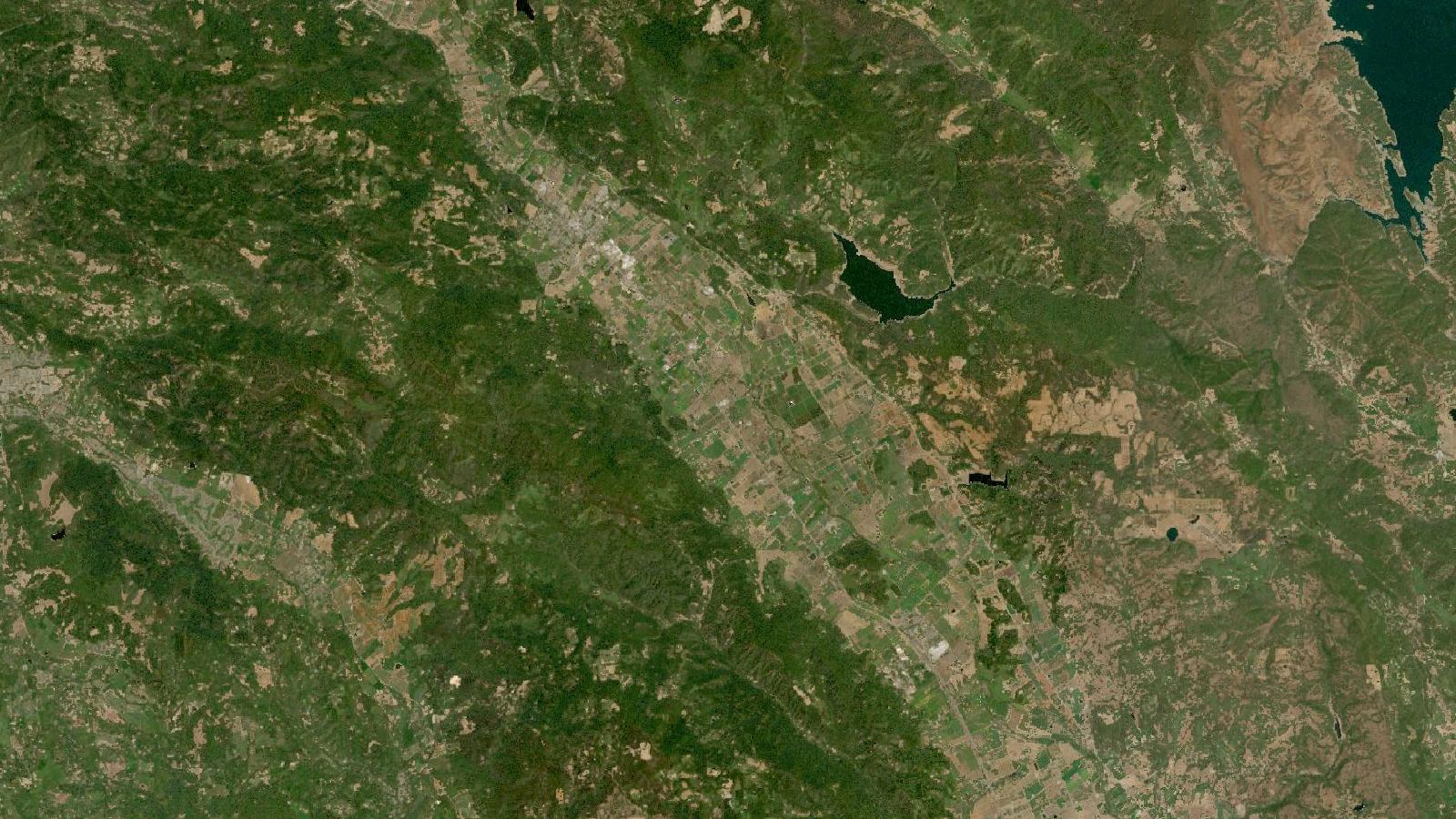
Cover: Landsat imagery of Napa Valley, California, United States, NASA (public domain).
Why use HLS for a vineyard time series
A vineyard block can change quickly enough that a long gap between usable images becomes frustrating. Yet combining ordinary Landsat and Sentinel-2 downloads without preparation can create a time series where a sensor difference looks like a crop difference. That is especially awkward for vineyard work, where an analyst may be looking for a modest fall in canopy greenness rather than a dramatic land-cover change.
NASA's Harmonized Landsat Sentinel-2, or HLS, is a useful starting point for this job in Napa Valley, California. The Version 2 products combine Landsat 8 and 9 OLI data with Sentinel-2 MSI data into common Military Grid Reference System tiles at 30 m. HLS applies atmospheric correction, co-registration, gridding and bandpass adjustment so that the two sensor families can be used in one surface-reflectance record. The public HLS image service describes a combined global land-observation interval of 1.6 days, although a particular vineyard will still have fewer usable observations once clouds and shadows are removed. NASA Earthdata HLS service
The important limitation appears in the same sentence as the advantage: this is a 30 m product. A pixel covers 900 square metres. Treat it as an indicator for a block or a set of sufficiently large, internally consistent blocks. Do not present it as a measurement of individual rows, vines or irrigation lines.
HLS Version 2 contains two related surface-reflectance products. L30 is sourced from Landsat 8/9 and S30 from Sentinel-2A, 2B and 2C. HLS outputs both at 30 m, even though Sentinel-2's source bands have native 10 m, 20 m and 60 m resolutions. The dataset begins with Landsat 8 acquisitions in 2013 and Sentinel-2 acquisitions in 2015. That makes it suitable for a recent multi-season comparison, provided the analyst keeps the resolution change in mind. HLS Version 2 User Guide
For this example, the aim is deliberately modest: produce a defensible NDVI table for a selected group of Napa Valley vineyard blocks during one growing season, then identify dates that deserve a closer look in higher-resolution imagery or field notes. It is not a prescription map.
The data choices that matter
Download HLS L30 and S30 granules covering the same date window and area of interest through NASA Earthdata. Keep the reflectance bands, the Fmask quality layer, metadata and acquisition date for every granule. HLS products are delivered as individual Cloud Optimized GeoTIFF files, which makes it practical to retain only the bands needed for the calculation and the quality file.
For NDVI, use red B04 and near-infrared B05:
NDVI = (B05 - B04) / (B05 + B04)
Those band names work for the shared red and NIR bands in the HLS convention. The HLS service itself uses B05 and B04 for its NDVI rendering rule. NASA Earthdata HLS service
There is one further preparation step. HLS reflectance bands are stored as scaled integers, so inspect the product metadata for the scale factor before calculating NDVI in QGIS. Apply the factor to B04 and B05 first, then calculate the index. Although a common multiplicative scale factor cancels algebraically in an ideal NDVI equation, explicit scaling makes the workflow readable, prevents mistakes when other bands are added, and avoids problems if invalid values are carried into a calculation.
Bring in vineyard-block polygons only if their boundary source and date are known. A polygon digitised from a recent aerial basemap may not match an older image perfectly, particularly around headlands or replanted edges. Dissolve only blocks that genuinely share management and crop conditions. A broad polygon that includes roads, buildings, cover crops and vines will produce a polite-looking mean with little agronomic meaning.
Worked QGIS workflow for Napa Valley blocks
Start with a small area, perhaps several blocks around Rutherford rather than the whole valley. Working small makes visual checking realistic. Set the QGIS project CRS to the UTM zone used by the HLS tile, rather than measuring areas in geographic coordinates.
-
Add one date's B04, B05 and Fmask GeoTIFF files to QGIS. Confirm that they align with the vineyard boundaries before calculating anything. HLS uses 110 by 110 km MGRS tiles and UTM projection, so neighbouring downloaded files may be from different tiles if the study area is near a tile edge. HLS Version 2 User Guide
-
Inspect the Fmask layer. In HLS Version 2, the quality layer carries per-pixel information for cloud, cloud shadow, snow, water and aerosol optical-thickness levels. The cloud and shadow flags are generated with Fmask 4.7. Do not assume that a bright-looking pixel is clear simply because it is visible in the RGB display. HLS Version 2 User Guide
-
Build a valid-pixel mask using the documented bit definitions in the HLS guide. For vineyard NDVI, exclude pixels flagged as cloud or cloud shadow. Exclude snow where relevant, and decide explicitly whether water pixels should be excluded. Save the mask as a separate raster. That file is evidence of the screening rule, not temporary clutter.
-
In Raster Calculator, calculate scaled red and NIR reflectance, then NDVI. Use a denominator check so that pixels where B05 plus B04 is zero are set to NoData. Multiply the resulting NDVI raster by the valid-pixel mask, or use an
ifexpression that returns NoData where the mask is invalid. -
Run Zonal statistics on the screened NDVI raster using the vineyard-block polygons. Record mean NDVI, valid-pixel count and standard deviation for each block. The count is essential. A mean derived from a handful of unmasked edge pixels should not sit beside a mostly valid observation as if both carried equal weight.
-
Repeat for every acquisition date, appending the date, product type, block identifier and statistics to one table. Plot each block's mean NDVI against date. Retain L30 and S30 as a field in the table, even though HLS has processed them into a common framework. It makes later checking much easier when an unexpected point appears.
-
Inspect any apparent drop against the source image, Fmask layer and the prior and subsequent valid observations. Flag it for interpretation only if it survives that check. A single low point next to masked cloud is usually an image-quality problem before it is a vineyard story.
The output should include the map, the CSV table, the saved mask expression, an acquisition list and a short methods note. A client or supervisor should be able to see exactly which scenes contributed to every plotted point.
The beginner mistake: treating harmonised data as identical data
HLS makes cross-sensor analysis more defensible. It does not make every remaining difference disappear. The processing resamples Landsat and Sentinel-2 spectral data to 30 m, maps them into the common grid, adjusts MSI bandpasses towards the OLI reference where applicable, and applies a view-angle adjustment. These are substantial improvements over stacking unrelated downloads, but they are processing choices, not a field measurement. HLS Version 2 User Guide
The common mistake is to calculate NDVI for all dates, join the table, see a jump, and label the jump water stress. That conclusion may be plausible, but the evidence is incomplete if the analyst has not checked pixel validity, block size, image date, cloud proximity and the continuity of the time series.
Cloud-shadow handling deserves particular care. HLS dilates cloud and cloud-shadow areas by 150 m during processing. This is helpful because cloud edges contaminate nearby reflectance, but it can leave a small vineyard block with very few valid pixels. Do not defeat that caution by filling masked pixels with zero before calculating a mean. Zero is a valid numerical value that will pull block NDVI downward and create a false decline.
Another trap is shrinking a 30 m HLS raster to a 10 m grid in QGIS and then describing the output as 10 m. Resampling changes the display grid, not the information contained in the pixel. Keep the analytical grid at 30 m. If row-scale variation matters, use a suitable native-resolution source and describe it as a different dataset, with a separate validation plan.
Reading the result with restraint
NDVI is a useful comparison measure, not a direct reading of vine health, yield or irrigation need. A fall in mean block NDVI can reflect canopy change, soil exposure, a management operation, shadows, mixed land cover at the block edge or residual quality issues. The sensible next move is to compare the date with operational notes and imagery, then decide whether a field visit or higher-resolution review is warranted.
This is where the HLS record earns its place. It gives an analyst more chances to build a clean sequence at a shared 30 m basis than relying on one sensor alone. The discipline is to preserve the quality information and report gaps honestly. A shorter series of valid block observations is more useful than a dense graph made from unexamined pixels.
Frequently asked questions
Is HLS NDVI suitable for individual vineyard rows?
No, HLS NDVI is not suitable for individual vineyard rows because every output pixel is 30 m by 30 m. Use it for larger block-level patterns, then inspect a fitting higher-resolution source when row or plant-scale detail is required.
Should I mix HLS L30 and S30 observations in one chart?
Yes, the products are designed for combined analysis after HLS harmonisation, but retain the product type in your table. Checking whether an unusual point is isolated to L30 or S30 is a sensible part of quality review.
Why did my vineyard block have no usable pixels on a clear-looking day?
The cloud-shadow screening may have removed the pixels, especially near cloud edges, or the block may be smaller than the usable portion of a 30 m pixel. Inspect Fmask before relaxing the rule or substituting values.
Does a lower NDVI prove water stress?
No, lower NDVI alone does not prove water stress. It is a signal to investigate alongside image quality, canopy management, field observations and other relevant information, rather than a diagnostic result by itself.
References
- NASA LP DAAC, HLS Version 2 User Guide
- NASA Earthdata, HLS Sentinel-2 Version 2 image service
- USGS, Landsat Collection 2 Quality Assessment Bands
Cover image: Landsat true-colour composite of Rutherford, Napa Valley (2000), NASA/USGS Landsat WELD via NASA GIBS (public domain).
Researched and drafted with AI assistance; sources are linked for verification.
Need this done for your own study area? Send me the area and what you need.
Cite this post
Khosla, J. (2026, October 28). A Cleaner HLS NDVI Series for Napa Valley Vineyards. Jannat Khosla. https://jannatkhosla.com/blog/a-cleaner-hls-ndvi-series-for-napa-valley-vineyards
› BibTeX
@online{khosla2026cleaner,
  author = {Khosla, Jannat},
  title = {A Cleaner HLS NDVI Series for Napa Valley Vineyards},
  date = {2026-10-28},
  url = {https://jannatkhosla.com/blog/a-cleaner-hls-ndvi-series-for-napa-valley-vineyards}
}